Das SparkFun RedBoard Qwiic ist eine Arduino-kompatible Platine, die Funktionen verschiedener Arduinos mit dem Qwiic Connect System kombiniert.
Merkmale
ATmega328-Mikrocontroller mit Optiboot-Bootloader
Kompatibel mit R3 Shield
CH340C Seriell-USB-Konverter
Spannungspegel-Jumper von 3,3 V bis 5 V
A4 / A5 Brücken
Spannungsregler AP2112
ISP-Header
Eingangsspannung: 7 V - 15 V
1 Qwiic-Anschluss
16 MHz Taktfrequenz
32 k Flash-Speicher
Komplette SMD-Konstruktion
Verbesserter Reset-Knopf
Stecken Sie ein Lesegerät in die Header, verwenden Sie ein Qwiic-Kabel, scannen Sie Ihren 125kHz-ID-Tag, und die eindeutige 32-Bit-ID wird auf dem Bildschirm angezeigt. Das Gerät kommt mit einer Lese-LED und einem Summer, aber keine Sorge, es gibt einen Jumper, den Sie schneiden können, um den Summer zu deaktivieren, wenn Sie wollen. Durch die Verwendung von SparkFuns praktischem Qwiic-System ist kein Löten erforderlich, um das Gerät mit dem Rest Ihres Systems zu verbinden. Dennoch haben wir die Pins im 0,1"-Abstand herausgebrochen, falls Sie lieber ein Breadboard verwenden möchten.
Der Qwiic RFID nutzt den integrierten ATtiny84A, um die sechs Byte lange ID Ihrer 125kHz-RFID-Karte zu erfassen, mit einem Zeitstempel zu versehen und auf einen Stapel zu legen, der bis zu 20 eindeutige RFID-Scans auf einmal speichert. Diese Informationen sind mit einigen einfachen I2C-Befehlen leicht abrufbar.
Der Arduino Pro Mini ist ein Mikrocontroller-Board auf Basis des ATmega328P.
Es hat 14 digitale Eingangs-/Ausgangs-Pins (von denen 6 als PWM-Ausgänge verwendet werden können), 6 analoge Eingänge, einen On-Board-Resonator, eine Reset-Taste und Löcher für die Montage von Stiftleisten. Eine sechspolige Stiftleiste kann mit einem FTDI-Kabel oder einem SparkFun-Breakout-Board verbunden werden, um die Platine über USB mit Strom zu versorgen und mit ihr zu kommunizieren.
Der Arduino Pro Mini ist für die semi-permanente Installation in Objekten oder Ausstellungen gedacht. Die Platine wird ohne vormontierte Stiftleisten geliefert, was die Verwendung verschiedener Arten von Steckern oder das direkte Anlöten von Drähten ermöglicht. Das Pin-Layout ist mit dem Arduino Mini kompatibel.
Technische Daten
Microcontroller
ATmega328P
Board Stromversorgung
5-12 V
Schaltung Betriebsspannung
5 V
Digitale E/A-Pins
14
PWM Pins
6
UART
1
SPI
1
I²C
1
Analogeingangs-Pins
6
Externe Interrupts
2
DC-Strom pro I/O-Pin
40 mA
Flash Memory
32 KB, davon 2 KB vom Bootloader verwendet
SRAM
2 KB
EEPROM
1 KB
Taktgeschwindigkeit
16 MHz
Abmessungen
18 x 33.3 mm
Downloads
Eagle files
Schematics
Die Pico Breakout Garden Base befindet sich unter Ihrem Pico und ermöglicht den Anschluss von bis zu sechs unserer umfangreichen Auswahl an Pimoroni-Breakouts. Sei es Umgebungssensoren, mit denen Sie die Temperatur und Luftfeuchtigkeit in Ihrem Büro im Auge behalten, eine ganze Reihe kleiner Bildschirme für wichtige Benachrichtigungen und Anzeigen und natürlich LEDs. Scrollen Sie nach unten für eine Liste der Breakouts, die derzeit mit unseren C++/MicroPython-Bibliotheken kompatibel sind! Neben einem beschrifteten Landebereich für Ihren Pico gibt es auch einen vollständigen Satz herausgebrochener Pico-Anschlüsse für den Fall, dass Sie noch mehr Sensoren, Kabel und Schaltkreise anschließen müssen. Wir haben einige Gummifüße eingebaut, um die Basis schön stabil zu halten und zu verhindern, dass sie Ihren Schreibtisch zerkratzt, oder es gibt M2,5-Befestigungslöcher an den Ecken, damit Sie sie bei Bedarf auf einer festen Oberfläche festschrauben können.
Bei den sechs stabilen schwarzen Steckplätzen handelt es sich um Kantenverbinder, die die Breakouts mit den Pins Ihres Pico verbinden. Es gibt zwei Steckplätze für SPI-Breakouts und vier Steckplätze für I²C-Breakouts. Da es sich bei I²C um einen Bus handelt, können Sie mehrere I²C-Geräte gleichzeitig verwenden, vorausgesetzt, sie haben nicht die gleiche I²C-Adresse (wir haben dafür gesorgt, dass alle unsere Breakouts unterschiedliche Adressen haben, und wir drucken sie auf der Rückseite auf). die Ausbrüche, damit sie leicht zu finden sind). Breakout Garden ist nicht nur eine praktische Möglichkeit, Ihrem Pico Funktionalität hinzuzufügen, sondern ist auch sehr nützlich für Prototyping-Projekte, ohne dass komplizierte Verkabelungen, Lötarbeiten oder Steckbretter erforderlich sind, und Sie können Ihr Setup jederzeit erweitern oder ändern.
Merkmale
Sechs stabile Kantensteckplätze für Breakouts
4x I²C-Steckplätze (5 Pins)
2x SPI-Steckplatz (7 Pins)
Landebereich mit Buchsenleisten für Raspberry Pi Pico
0,1-Zoll-Raster, 5- oder 7-polige Steckverbinder
Ausgebrochene Stifte
Verpolungsschutz (in Breakouts integriert)
Zu 99 % montiert – nur noch die Füße aufkleben!
Kompatibel mit Raspberry Pi Pico
Dank seiner sechs stabilen Steckplätze ermöglicht Breakout Garden den Benutzern das einfache Plug-and-Play mit verschiedenen kleinen Breakout-Boards.
Stecken Sie einfach ein oder mehrere Boards in die Steckplätze im Breakout Garden HAT und schon kann es losgehen. Die Mini-Breakouts fühlen sich in den Edge-Connector-Steckplätzen sicher genug an und es ist sehr unwahrscheinlich, dass sie herausfallen.
An der Oberseite des Breakout Garden befinden sich eine Reihe nützlicher Pins, mit denen Sie andere Geräte anschließen und in Ihr Projekt integrieren können.
Dank des Verpolungsschutzes müssen Sie sich keine Sorgen machen, wenn Sie eine Platine falsch herum einsetzen. Es spielt auch keine Rolle, welchen Steckplatz Sie für jeden Breakout verwenden, da die I²C-Adresse des Breakouts von der Software erkannt wird und diese korrekt erkennt, falls Sie sie verschieben.
Merkmale
Sechs stabile Kantensteckplätze für Pimoroni-Breakouts
0,1-Zoll-Raster, 5-polige Anschlüsse
Ausgebrochene Stifte (1 × 10 Streifen- oder Stiftleiste im Lieferumfang enthalten)
Im Lieferumfang sind Abstandshalter (M2,5, 10 mm Höhe) enthalten, um Ihren Breakout Garden sicher zu halten
Verpolungsschutz (in Breakouts integriert)
Platine im HAT-Format
Kompatibel mit Raspberry Pi 3 B+, 3, 2, B+, A+, Zero und Zero W
Es wird empfohlen, die mitgelieferten Abstandshalter zu verwenden, um Breakout Garden an Ihrem Raspberry Pi zu befestigen.
Software
Breakout Garden erfordert keine eigene Software, aber jeder von Ihnen verwendete Breakout benötigt eine Python-Bibliothek. Auf der Breakout Garden GitHub-Seite finden Sie ein automatisches Installationsprogramm, das die entsprechende Software für einen bestimmten Breakout installiert. Es gibt auch einige Beispiele, die Ihnen zeigen, was Sie sonst noch mit Breakout Garden machen können.
You can use RF Explorer 3G Combo equally well outdoor and indoor, and you can also connect it to a PC for extra functionality using standard mini-USB 2.0 connector.
This model includes a WSUB1G baseline unit plus an RFEMWSUB3G Expansion Module conveniently assembled and tested. It comes with two SMA connectors and two antennas,a dual band telescopic 144 / 430 MHz antenna for all Sub-GHz frequencies and a whip helical antenna for 2.4 GHz band. Additional, specific band antennas may be needed to cover efficiently some of the frequencies supported.
The combination of these two models offer the wide band coverage of the WSUB3G module, together with the highest sensitivity and quick response of the WSUB1G model for the popular sub-1GHz frequencies.
Features
Pocket size and light weight
Solid aluminum metal case
Includes a transport EVA carry case for RF Explorer
Spectrum Analyzer mode with Peak Max and Hold, Normal, Overwrite and Averaging modes
Lifetime free firmware upgrades available, open to community requested features
High capacity Lipo for 16 hours+ of continuous run, rechargeable by USB
Windows PC client Open Source
Can be extended with internal Expansion Modules for additional band and functionality
Wide band coverage to all popular RF frequencies, starting at 15 MHz and going up to 2.7 GHz. This includes very interesting frequency areas such as 2 m HAM radio, all VHF and UHF, FM radio, GPS, WiFi and WiMax, Bluetooth, etc.
Firmware: RF Explorer 3G Combo is delivered with upgraded firmware v1.09. Note some of the features and operation accuracy will be improved in upcoming free firmware revisions.
Specifications
Battery
Lithium Cells / Batteries contained in equipment UN3481 - PI967
Frequency band
15-2700 MHz
Frequency span
112 KHz - 600 MHz
Graphics LCD
128 x 64 pixels, great visibility outdoors
PC Windows client
supports Windows XP/Vista/Win7 both 32 and 64bits
Backlight
for great indoor visibility
2 standard SMA 50 ohms connector,
one for Sub-GHz wideband Nagoya NA-773 telescopic antenna included and another 2.4 GHz one for 15-2700 MHz band with helical antenna included.
Amplitude resolution
0.5 dBm
Dynamic range
Left SMA port (WSUB1G)
-115 dBm to 0 dBm
Right SMA port (WSUB3G)
-110 dBm to -10 dBm
Absolute Max input power
Left SMA port (WSUB1G)
+5 dBm
Right SMA port (WSUB3G)
+30 dBm
Average noise level (typical)
-110 dBm
Frequency stability and accuracy (typical)
+-10 ppm
Amplitude stability and accuracy (typical)
+-6 dBm
Frequency resolution
1 KHz
Resolution bandwidth (RBW)
automatic 3 KHz to 600 KHz
Weight
185 g
Size
113 x 70 x 25 mm
Included
RF Explorer 3G Combo
Nagoya NA-773 wideband telescopic antenna
2.4 GHz band antenna
EVA Case
Documentation
For more info and to get started with your RF Explorer, visit the start page.
For questions and support, please visit https://support.rf-explorer.com
MIT INGENIEURSGEIST - AUS DER EU UND DEN USA DIE VISION UND TECHNIK HINTER SPARKFUN ERSTE SCHRITTE MIT MICROMOD MEIN GETUNTER SPARKFUN-JETBOTWie ich meinen von einem Jetson Nano von NVIDIA gesteuerten JetBot aufgebohrt habe PROGRAMMIERUNG EINES FPGAS WIE MAN EINE GNSS-REFERENZSTATION BAUT CLOCKCLOCK: ZEIT-ANZEIGE DER BESONDEREN ART UNTER DER LUPE: SPARKFUN INVENTOR'S KIT GLENN SAMALA VON SPARKFUN ÜBER PRODUKTENTWICKLUNG UND NEUE PROJEKTE EIGENE BOARDS ENTWICKELN MIT SPARKFUNS À LA CARTE ENTWERFEN MIT DEM SPARKFUN-ARTEMIS ERSTE SCHRITTE MIT DEM QWIIC-ÖKOSYSTEM FÜR SCHNELLES PROTOTYPING POSTER - QWIIC UNTER DER LUPE: DAS DIY-LIPO-SUPERCHARGER-KIT VON GREATSCOTT! UND ELEKTOR UNVERGESSLICHE ELEKTRONIK AUS DER GESCHICHTE VON SPARKFUN PERFEKTES EINPARKEN MIT LIDAR EIN HANDGEMACHTES BURIED PAD VOM ENTWURF ZUM VERKAUF: DER SPARKFUN-RTK-SURVEYOR „HELLO WORLD“ VOM RASPBERRY PI PICO UND RP2040Ein Blick auf den ersten Mikrocontroller der Raspberry Pi Foundation VIERBEINIGER ROBOTER SELBSTGEBAUT POSTER - MICROMOD RISC-V-IOT-ENTWICKLUNG MIT FREERTOS-BIBLIOTHEKEN FÜR AWS ELEKTRONIK MACHT SPASSEin Gespräch unter Elektronik-Enthusiasten HEXADOKUSudoku für Elektroniker
A Practical Guide to AI, Python, and Hardware Projects
Welcome to your BeagleY-AI journey! This compact, powerful, and affordable single-board computer is perfect for developers and hobbyists. With its dedicated 4 TOPS AI co-processor and a 1.4 GHz Quad-core Cortex-A53 CPU, the BeagleY-AI is equipped to handle both AI applications and real-time I/O tasks. Powered by the Texas Instruments AM67A processor, it offers DSPs, a 3D graphics unit, and video accelerators.
Inside this handbook, you‘ll find over 50 hands-on projects that cover a wide range of topics—from basic circuits with LEDs and sensors to an AI-driven project. Each project is written in Python 3 and includes detailed explanations and full program listings to guide you. Whether you‘re a beginner or more advanced, you can follow these projects as they are or modify them to fit your own creative ideas.
Here’s a glimpse of some exciting projects included in this handbook:
Morse Code Exerciser with LED or BuzzerType a message and watch it come to life as an LED or buzzer translates your text into Morse code.
Ultrasonic Distance MeasurementUse an ultrasonic sensor to measure distances and display the result in real time.
Environmental Data Display & VisualizationCollect temperature, pressure, and humidity readings from the BME280 sensor, and display or plot them on a graphical interface.
SPI – Voltmeter with ADCLearn how to measure voltage using an external ADC and display the results on your BeagleY-AI.
GPS Coordinates DisplayTrack your location with a GPS module and view geographic coordinates on your screen.
BeagleY-AI and Raspberry Pi 4 CommunicationDiscover how to make your BeagleY-AI and Raspberry Pi communicate over a serial link and exchange data.
AI-Driven Object Detection with TensorFlow LiteSet up and run an object detection model using TensorFlow Lite on the BeagleY-AI platform, with complete hardware and software details provided.
A Practical Guide to AI, Python, and Hardware Projects
Welcome to your BeagleY-AI journey! This compact, powerful, and affordable single-board computer is perfect for developers and hobbyists. With its dedicated 4 TOPS AI co-processor and a 1.4 GHz Quad-core Cortex-A53 CPU, the BeagleY-AI is equipped to handle both AI applications and real-time I/O tasks. Powered by the Texas Instruments AM67A processor, it offers DSPs, a 3D graphics unit, and video accelerators.
Inside this handbook, you‘ll find over 50 hands-on projects that cover a wide range of topics—from basic circuits with LEDs and sensors to an AI-driven project. Each project is written in Python 3 and includes detailed explanations and full program listings to guide you. Whether you‘re a beginner or more advanced, you can follow these projects as they are or modify them to fit your own creative ideas.
Here’s a glimpse of some exciting projects included in this handbook:
Morse Code Exerciser with LED or BuzzerType a message and watch it come to life as an LED or buzzer translates your text into Morse code.
Ultrasonic Distance MeasurementUse an ultrasonic sensor to measure distances and display the result in real time.
Environmental Data Display & VisualizationCollect temperature, pressure, and humidity readings from the BME280 sensor, and display or plot them on a graphical interface.
SPI – Voltmeter with ADCLearn how to measure voltage using an external ADC and display the results on your BeagleY-AI.
GPS Coordinates DisplayTrack your location with a GPS module and view geographic coordinates on your screen.
BeagleY-AI and Raspberry Pi 4 CommunicationDiscover how to make your BeagleY-AI and Raspberry Pi communicate over a serial link and exchange data.
AI-Driven Object Detection with TensorFlow LiteSet up and run an object detection model using TensorFlow Lite on the BeagleY-AI platform, with complete hardware and software details provided.
,
von Saad Imtiaz
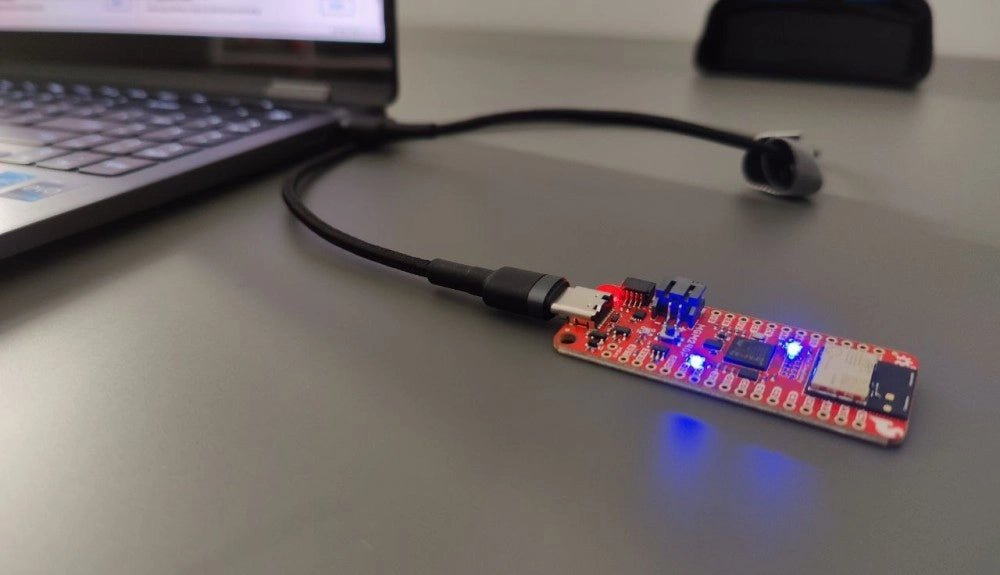
SparkFun Thing Plus Matter (MGM240P): Ein vielseitiges IoT-Entwicklungsboard basierend auf Matter (Testbericht)
Das SparkFun Thing Plus Matter - MGM240P ist ein vielseitiges und funktionsreiches Entwicklungsboard für die Erstellung von Matter-basierten IoT-Geräten. Matter, früher bekannt als Project CHIP...
,
von Clemens Valens
Zwei neue Arduino UNO R4 Boards: Minima und Wi-Fi
Der leistungsstarke Arduino UNO R4 ist das neueste Mitglied der kultigen Arduino UNO Familie. Es gibt ihn sogar in zwei Versionen. Werfen wir einen Blick...
,
von Clemens Valens
Arduino Alvik, ein Wendepunkt in der STE(A)M-Ausbildung? (Review)
Eine Möglichkeit, die Ingenieure von morgen zu finden und hervorzubringen, besteht darin, unter unseren Kindern zu suchen. Die Idee besteht darin, ihnen unterhaltsame und einfach...